Drink the Ocean
Sip the ocean, press salt, buy upgrades, pull the plug.
Free, in your browser, no download
Loading the game…
What Is Drink the Ocean?
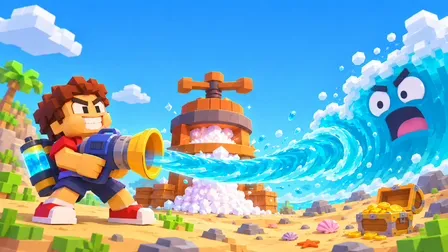
Drink the Ocean is a free blocky first-person simulator by Pinidi Studio. You walk to the water, sip the sea dry through a straw, then squeeze the water into salt at the beach PRESS. You spend the salt on upgrades. As the water drops, a shipwreck, a whale skeleton and a sunken city come into view.
How to Play Drink the Ocean
- Drink: Walk to the water and left click to sip through the straw. On phones, hold the DRINK button instead. Keep drinking until your belly is full and you cannot hold any more water.
- Press and shop: Stand under the PRESS on the beach to turn the water in your belly into salt. Then step on the blue SHOP pad and spend that salt on a bigger belly, extra straws and new tools.
- Pull the plug: Keep draining until you reach the plug at the bottom and pull it. You then start a stronger new ocean of your choice: cola, lemonade, slime or lava.
Drink the Ocean Tips and Controls
Keep the Loop Moving
Empty your belly at the PRESS as soon as it fills, so you never stall at the shoreline. Visit the SHOP pad often, because small upgrades stack into much faster drains over a run.
Tip: Press salt out the moment your belly is full.
PC Controls
Move with WASD, look with the mouse, drink with left click and jump with Space. Switch tools with 1, 2 and 3, press T to go home, E for Sky Duck gifts, P for settings and Tab to free the cursor.
Tip: Click inside the player first so keys register.
Phone Controls
Turn your phone to landscape or use fullscreen before you drink. Use the on-screen stick if shown to move, drag to look, hold DRINK to sip, and tap the jump and tool buttons.
Tip: Play in landscape or fullscreen on phones.
Drink the Ocean Game Features
- Sip, Press, Shop, Plug: The core loop is clear: drink water, press it into salt, spend salt in the shop, then pull the plug. Each cycle makes your next drain faster and your next ocean tougher.
- Upgrades and Tools: Buy a bigger belly to hold more water and extra straws to drain faster. You can also unlock a mouth vacuum and a pocket whirlpool, and switch between tools with the 1, 2 and 3 keys.
- Secrets Under the Water: Lower the waterline far enough and you uncover a shipwreck, a whale skeleton and a sunken city. Along the way you can collect Sky Duck boons and achievements.
Why Play Drink the Ocean
- 🌊 Simple, satisfying goal: The goal is easy to grasp: drain the whole ocean through a straw. Each upgrade makes the waterline drop noticeably faster, which keeps short sessions rewarding.
- 🌐 Free in your browser: Drink the Ocean runs in your browser with no account and no install. It often works on school or work networks that block app stores, if the game host is not filtered.
- 🐋 Things to discover: Draining far enough reveals a shipwreck, a whale skeleton and a sunken city. Sky Duck boons, achievements and new oceans give you reasons to start another run.
- 📱 Plays on desktop and phone: Use the keyboard and mouse on PC, or the on-screen controls on Android and iOS. Landscape mode or fullscreen gives phone players the best view.
Drink the Ocean No Download Required
Drink the Ocean runs right in your browser, so there is nothing to install. Click Play Now, walk to the water and start sipping. Click inside the player first so the page does not steal your keys, and use landscape or fullscreen on a phone.
Sprunki Phase 9.5: If you want a relaxed browser game after draining an ocean, try Sprunki Phase 9.5. You drag characters onto a stage to layer sounds and build your own loop, with no download needed. Play it free online here.
Drink the Ocean FAQ
Is Drink the Ocean free to play?
Yes. You can play Drink the Ocean free online in your browser on desktop, Android or iOS. No account or download is needed. The hosted player may offer optional in-game purchases.
Who developed Drink the Ocean?
Drink the Ocean was developed by Pinidi Studio. It is an HTML5 browser game for one player, listed with a release date of 2026-11-10.
How do I earn salt in Drink the Ocean?
Drink water until your belly is full, then stand under the PRESS on the beach. It squeezes the water into salt, which you can spend at the blue SHOP pad on upgrades and tools.
What can I buy in the Drink the Ocean shop?
You can spend salt on a bigger belly, extra straws, a mouth vacuum and a pocket whirlpool. Together they let you hold more water and drain the ocean faster.
What happens after I drain the ocean?
Pull the plug at the bottom and start a stronger new ocean. You can choose cola, lemonade, slime or lava for your next run.
What are the Drink the Ocean controls?
On PC, use WASD to move, the mouse to look, left click to drink, Space to jump and 1, 2, 3 for tools. T goes home, E opens Sky Duck gifts, P opens settings and Tab frees the cursor.
Can I play Drink the Ocean on my phone?
Yes. It runs in mobile browsers on Android and iOS. Turn your phone to landscape or use fullscreen, then hold the DRINK button to sip and use the on-screen buttons to jump and switch tools.
Is Drink the Ocean a Roblox game?
No. This Drink the Ocean is a browser game by Pinidi Studio and runs without Roblox. A Roblox experience with a similar name is a different game.
Is Drink the Ocean on Steam?
Not right now. There is no official Steam release from Pinidi Studio, so the free browser version is the way to play it.
Is there a Drink the Ocean APK or download?
No. Drink the Ocean is a free browser game. You open the page, click Play Now and start sipping, with no APK, app-store install or desktop download.
What languages does Drink the Ocean support?
The hosted version supports 15 languages, including English, Spanish, French, German, Portuguese, Italian, Japanese, Korean and Chinese. Pick your language in the in-game settings.
Where is my Drink the Ocean progress saved?
Saving is handled by the hosted player and your browser, not by an account on this site. Clearing site data, switching browsers or changing devices may lose your run.
Comments
No comments yet. Share your high score or a tip.
 HOT



 HOT
 HOT
 HOT
 HOT
 HOT
 HOT
 HOT