What Is Pokemon All 22?
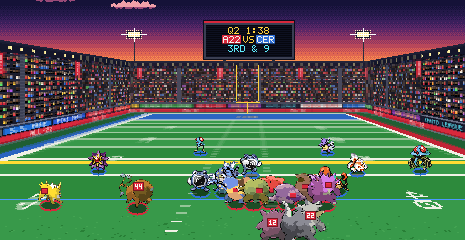
Pokemon All 22 is a free fan project that combines a team builder with football modes. You set 11 offensive and 11 defensive Pokemon, review their stats, then save or share the lineup. From there you can open ALL-22 BOWL, a side-view Tecmo-style mode, or ALL-22 PRO, which uses a behind-the-huddle view.
The game itself runs on the official all22pokemon.com page, which does not allow being framed elsewhere, so Play now launches it in a separate pop-up window. If your browser blocks the pop-up, use the link under the play button.
How to Play Pokemon All 22
- Build your lineup: Open the builder, where the field holds 22 positions across offense and defense. Click a player to replace it, hover to inspect stats, or drag one player onto another to swap spots.
- Set your options: Pick a generation range, toggle Legendary Pokemon, choose a 3-4 or 4-3 defense, switch FB to Slot offense, add a kicker if you want one, and choose Pixel, Retro or Artwork sprites.
- Pick a mode and play: Use Save image or Copy link before you leave the builder. Then open the official page, choose ALL-22 BOWL or ALL-22 PRO, and follow the on-screen instructions to start a match.
Pokemon All 22 Tips for Your First Lineup
Lineup settings
Use the generation range and the Legendary toggle to control which Pokemon can appear in your lineup. Choose a 3-4 or 4-3 defense and decide whether to use a kicker before you build.
Tip: Set generations and formation first.
Editing players
Click a player to replace it, hover to read the stats shown for that role, or drag one player onto another to swap positions. Check stats before you lock in a spot.
Tip: Hover to inspect stats before swapping.
Before you play
Save image or Copy link before you leave the builder, since that keeps a record of your setup. If you choose Pro, check the listed receiver, passing and ball-carrying hints before the snap.
Tip: Save your lineup, then read the Pro hints.
Why Play Pokemon All 22
- 🏈 Build all 22 positions: Every offensive and defensive spot is editable. Swap Pokemon, inspect their stats and shape a team that fits the way you want to play before you open a football mode.
- 🎮 Two football modes: BOWL uses a side-view, Tecmo-style presentation. PRO uses a behind-the-huddle camera and has its own league and draft paths. Pick the style you like best.
- 🔗 Save and share your team: Export your lineup as an image or copy a link to share its setup. Randomize gives you a different team, and Reset and Clear help you start over.
- 🎨 Three sprite styles: Pixel, Retro and Artwork sprites let you change how the whole lineup looks on the field.
Pokemon All 22 No Download Required
Pokemon All 22 runs in your browser, so there is nothing to install. Press Play now to open the official page in a pop-up window, choose ALL-22 BOWL or ALL-22 PRO, use the region selection and on-screen instructions, and start a match.
Related pages
- Block Blast: a quick puzzle break after a football match
- Slice Master: one-button slicing action
- Suika Game home:everything on this site
About this site
Pokemon All 22 is a fan project and is not affiliated with Nintendo, Game Freak, Creatures or The Pokemon Company. SuikaGameJa is an unofficial fan site and is not affiliated with them either. Game availability can change at the publisher's discretion.
 HOT



 HOT
 HOT
 HOT
 HOT
 HOT
 HOT
 HOT