Every Last Grain
Dig an entire desert one spoonful at a time, sell the sand by the kilo and hunt down 14 buried finds — free in your browser, no download.
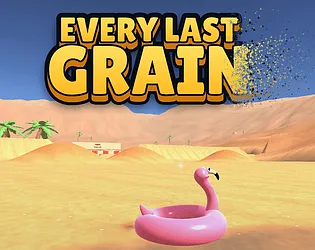
Free, in your browser, no download
Loading the game…
Popular games on SuikaGameJa
See all games → HOT
 HOT
 HOT
 HOT
 HOT
 HOT
 HOT
 HOT
 HOT
 HOT
What is Every Last Grain?
The new owner wants the desert gone. Every last grain. He pays by the kilo. Cash. Nobody asks about the last guy. So you brought a spoon.
— the developer's own description on the itch.io store page
Everything in Every Last Grain follows from those four lines. It is a free first-person incremental game from solo developer Oliver Kuso, built in Unity as an HTML5 browser build and published as a demo on itch.io in November 2026. You walk a desert lot, vacuum the sand out of the ground one pile at a time, get paid by the kilogram, and spend the cash on tools that dig faster. The store page puts the demo at about half an hour at the Lot Edge, with 14 finds buried somewhere in the sand. "One of them is very special," it says — dig deep enough and you will know which.
| Developer | Oliver Kuso, solo |
| Build | Unity, HTML5 — runs in the tab |
| Price | Free demo, no download, no account |
| Length | About half an hour at the Lot Edge |
| Rating on itch.io | 4.7 / 5 from 107 ratings (late November 2026) |
| Status | Demo live, full game in development |
How to play Every Last Grain
There is one verb and one number. The verb is dig; the number is kilograms. Everything else is the game layering tools and multipliers on top of those two things.
- Dig. Point at a pile of sand and hold the dig control — left mouse button, or hold E if you would rather use the keyboard. The sand flies into your total as kilograms.
- Get paid. The buyer pays by the kilo, in cash. No haggling, no quest giver to walk back to.
- Upgrade. Cash buys better tools. The demo starts you on a spoon and works up to a proper vacuum, and the shop is where the game turns incremental.
- Sweep the area clean. Since Update 11 an area only counts as finished when every visible pile is gone — 99% is not done, and the last chunk is still yours to dig.
- Call the sandstorm. Press Q, or pick it from the pause menu, once the Lot Edge is empty and the desert fills back up.
- Replay for more XP. Every sandstorm round raises what you earn per kilogram: round two pays x1.5, and the multiplier climbs to x3 (Update 8). Replays, not longer sessions, are where the big tools come from.
Controls
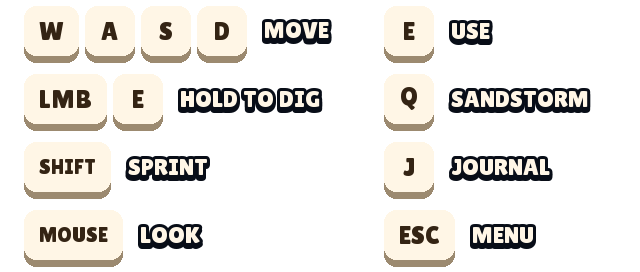
These are the demo's default bindings, the same list the in-game menu shows under its CONTROLS tab:
| Action | Key |
|---|---|
| Move | W A S D |
| Look | Mouse |
| Dig (hold) | Left mouse button, or hold E |
| Use | E |
| Sprint | Shift |
| Sandstorm | Q |
| Journal | J |
| Menu | Esc on the in-game card — press P in a browser |
Two things to know before you start. Left mouse and E both dig, so you can swap hands mid-session — the developer suggests exactly that for long runs. And although the in-game card lists Esc for the menu, Esc belongs to the browser: it releases the mouse and drops you out of fullscreen. That is why the developer tells players to press P for the pause menu, which is also where the volume, the CONTROLS tab and the mouse sensitivity slider live. Sensitivity matters more than it sounds — a slower, steadier aim clears a pile in fewer swipes than a fast one.
The developer's own advice is mouse and keyboard, in fullscreen, on a computer. On a phone you are fighting the controls rather than playing, so treat this as a desktop game.
What the three tutorial cards show
These three images are not screenshots of the desert. They are the demo's in-game instruction cards: item icons plus the key bindings that go with them, the same cards that sit in the game next to the menu's key list. Each one names a single step of the loop, which makes them the fastest way to see what the game asks of you before it finishes loading.
Card 1 — DIG: hold the dig control, empty the lot
This is the digging card, and it is the verb the whole game runs on: hold the dig control at a pile and the sand leaves the ground instead of needing to be clicked out grain by grain.
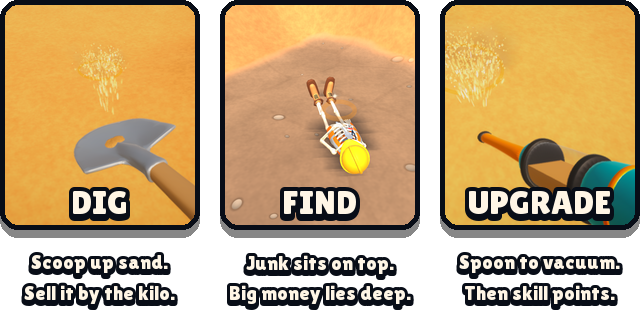
Card 2 — FIND: sweep every pile, or the 14 finds stay buried
This is the card for the buried finds. It covers the second half of the loop: the sand is not only money, it is a hiding place. Since Update 2 the finds no longer peek out of the sides of a pile, so you have to dig a pile out rather than scan corners for something sticking out.

Card 3 — UPGRADE: turn kilograms into better tools
This is the upgrade card: what the cash is for. It is the step that turns a spoon into a vacuum and keeps the loop going, and it is the one card whose meaning changes most between visits — the demo has been patched weekly, and tool prices and reach have moved with it.
Watch it played: two walkthrough videos
Reading the bindings is one thing; watching the loop is faster. These two cover different needs — a short first look if you are still deciding, a full run if you want the whole arc before you start.
First look — DangerouslyFunny
A first-look video from DangerouslyFunny, useful if you just want to see what the digging and selling actually looks like before you give up half an hour to it.
Full playthrough — Sonoket Gaming
A full playthrough from Sonoket Gaming, a better pick if you want to watch the whole run — sandstorms, the shop and the finds — before deciding to start.
Demo, updates and what's next
What you play here is the demo: roughly half an hour of digging at the Lot Edge. The store page lists what comes next for the full game — oases, a shipwreck, a pyramid and a sandstorm — and the developer writes in the comments that "the full game is on its way with more areas, bigger machines and a few surprises deeper down."
The demo moves fast. It took 14 updates in its first week, mostly off Discord and Reddit feedback: sealed save files, a guard that keeps the cash number honest, longer vacuum reach, and a sandstorm you can trigger with Q at any time. The two most recent notes, Update 13: Sealed saves and a real parking lot and Update 14: the cash stays put, were both posted within a day of the store page snapshot this page is based on. On itch.io it holds a 4.7 out of 5 rating from 107 ratings as of late November 2026.
Is it free, and does it save?
Yes on both counts. The demo is free in the browser with no download and no account, and it saves your money, tools and finds locally — since Update 13 the save file is sealed, so it can no longer be edited from the browser console. It is English only for now, and it is in active development, so expect tools, prices and areas to keep shifting between visits.
Tips for clearing the desert faster
- Empty a pile before you start the next one. A single straggling pile keeps the whole area open, and you will be hunting for it later.
- Watch the kg/s counter, not the total. It tells you whether a new tool actually earns faster or just vacuums wider.
- Treat replays as your upgrade engine. With the XP multiplier climbing to x3, clearing a small area quickly beats polishing a big one.
- Lower the mouse sensitivity and play fullscreen — precise vacuuming around a find is easier than swinging a fast camera.
- Check the devlog before a long session. The demo changes weekly, and several earlier bugs were only fixed after players reported them.
Looking for something else? Try other arcade games, the new games list, or a suika-style merge puzzle if you want a calmer five minutes.
Frequently asked questions
Is Every Last Grain free?
Yes. The demo is free to play in the browser on itch.io — no download, no account and no payment. The full game is still in development and has not been released yet.
Is this the full Every Last Grain game or just a demo?
This is the demo. It offers about half an hour of digging at the Lot Edge. The developer says the full game will add oases, a shipwreck, a pyramid and a sandstorm.
What are the controls in Every Last Grain?
It is a first-person game. W A S D moves, the mouse looks, and you hold the left mouse button (or E) to vacuum up sand. Shift sprints, Q calls the sandstorm, J opens the journal and E is also the use key. The in-game card lists Esc for the menu, but in a browser you press P — that pause menu holds the CONTROLS tab, every binding and the mouse sensitivity slider.
Can I play Every Last Grain on a phone?
Not comfortably. The demo is built around a mouse and a keyboard, and the developer recommends playing it in fullscreen on a computer. On a phone the digging controls get in the way.
How many finds are there?
There are 14 buried finds in the demo, and the developer says one of them is very special. Since Update 2 they no longer peek out of the sides of a sand pile, so you have to dig through a pile to find them.
What happens when I clear the whole Lot Edge?
Press Q to call a sandstorm — or pick it from the pause menu (P) — and the desert fills up again. Every replay raises the XP you earn per kilogram: the second round pays x1.5, and the multiplier climbs up to x3.
Why is an area still not finished when I'm at 99%?
Because of Update 11: an area is only swept clean once every visible pile is gone. The last chunk is yours to dig, so a straggling pile in a corner will keep the area open.
Who made Every Last Grain?
It was made by solo developer Oliver Kuso with Unity and published as a browser build on itch.io in November 2026. Music and sound are CC0 assets from Freesound and Kenney.
Does the game save my progress?
The demo saves your money, tools and finds locally in the browser. Update 13 sealed the save file so it can no longer be edited from the browser console.
Comments
No comments yet. Share your high score or a tip.